Spinner#
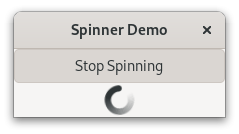
The Gtk.Spinner displays an icon-size spinning animation.
It is often used as an alternative to a Gtk.ProgressBar
for displaying indefinite activity, instead of actual progress.
To start the animation, use Gtk.Spinner.start(),
to stop it use Gtk.Spinner.stop().
Example#
 1import gi
 2
 3gi.require_version("Gtk", "4.0")
 4from gi.repository import Gtk
 5
 6
 7class SpinnerAnimation(Gtk.ApplicationWindow):
 8    def __init__(self, **kargs):
 9        super().__init__(**kargs, title="Spinner Demo")
10
11        button = Gtk.ToggleButton(label="Start Spinning", active=False)
12        button.connect("toggled", self.on_button_toggled)
13
14        self.spinner = Gtk.Spinner()
15
16        box = Gtk.Box(orientation=Gtk.Orientation.VERTICAL, homogeneous=True)
17        box.append(button)
18        box.append(self.spinner)
19        self.set_child(box)
20
21    def on_button_toggled(self, button):
22        if button.props.active:
23            self.spinner.start()
24            button.set_label("Stop Spinning")
25
26        else:
27            self.spinner.stop()
28            button.set_label("Start Spinning")
29
30
31def on_activate(app):
32    win = SpinnerAnimation(application=app)
33    win.present()
34
35
36app = Gtk.Application(application_id="com.example.App")
37app.connect("activate", on_activate)
38
39app.run(None)
Extended example#
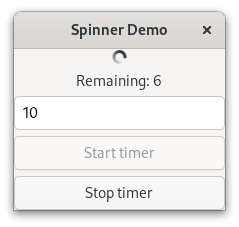
An extended example that uses a timeout function to start and stop
the spinning animation.
The on_timeout() function is called at regular intervals
until it returns False, at which point the timeout is automatically
destroyed and the function will not be called again.
Example#
 1import gi
 2
 3gi.require_version("Gtk", "4.0")
 4from gi.repository import Gtk, GLib
 5
 6
 7class SpinnerAnimation(Gtk.ApplicationWindow):
 8    def __init__(self, **kargs):
 9        super().__init__(**kargs, title="Spinner Demo")
10
11        main_box = Gtk.Box(orientation=Gtk.Orientation.VERTICAL, spacing=6)
12        self.set_child(main_box)
13
14        self.spinner = Gtk.Spinner()
15        main_box.append(self.spinner)
16
17        self.label = Gtk.Label()
18        main_box.append(self.label)
19
20        self.entry = Gtk.Entry(text="10")
21        main_box.append(self.entry)
22
23        self.button_start = Gtk.Button(label="Start timer")
24        self.button_start.connect("clicked", self.on_button_start_clicked)
25        main_box.append(self.button_start)
26
27        self.button_stop = Gtk.Button(label="Stop timer", sensitive=False)
28        self.button_stop.connect("clicked", self.on_button_stop_clicked)
29        main_box.append(self.button_stop)
30
31        self.timeout_id = None
32        self.connect("unrealize", self.on_window_destroy)
33
34    def on_button_start_clicked(self, _widget):
35        """Handles 'clicked' event of button_start."""
36        self.start_timer()
37
38    def on_button_stop_clicked(self, _widget):
39        """Handles 'clicked' event of button_stop."""
40        self.stop_timer("Stopped from button")
41
42    def on_window_destroy(self, _widget):
43        """Handles unrealize event of main window."""
44        # Ensure the timeout function is stopped
45        if self.timeout_id:
46            GLib.source_remove(self.timeout_id)
47            self.timeout_id = None
48
49    def on_timeout(self):
50        """A timeout function.
51        Return True to stop it.
52        This is not a precise timer since next timeout
53        is recalculated based on the current time.
54        """
55        self.counter -= 1
56        if self.counter <= 0:
57            self.stop_timer("Reached time out")
58            return False
59        self.label.props.label = f"Remaining: {int(self.counter / 4)!s}"
60        return True
61
62    def start_timer(self):
63        """Start the timer."""
64        self.button_start.props.sensitive = False
65        self.button_stop.props.sensitive = True
66        # time out will check every 250 milliseconds (1/4 of a second)
67        self.counter = 4 * int(self.entry.props.text)
68        self.label.props.label = f"Remaining: {int(self.counter / 4)!s}"
69        self.spinner.start()
70        self.timeout_id = GLib.timeout_add(250, self.on_timeout)
71
72    def stop_timer(self, label_text):
73        """Stop the timer."""
74        if self.timeout_id:
75            GLib.source_remove(self.timeout_id)
76            self.timeout_id = None
77        self.spinner.stop()
78        self.button_start.props.sensitive = True
79        self.button_stop.props.sensitive = False
80        self.label.props.label = label_text
81
82
83def on_activate(app):
84    win = SpinnerAnimation(application=app)
85    win.present()
86
87
88app = Gtk.Application(application_id="com.example.App")
89app.connect("activate", on_activate)
90
91app.run(None)